Linear
Smooth consistent keystroke with no bump. The stem goes straight down.
- Feel: Linear, Smooth, buttery
- Sound: Quiet(er)
- Best For: Gaming, Fast Typing
If the PCB is the brain of the keyboard, the switch is the soul of a keyboard. It determines the feel, the sound, and the responsiveness of every keystroke. Whether you want a silent office keyboard or a "thocky" gaming setup, it all starts with the switch.
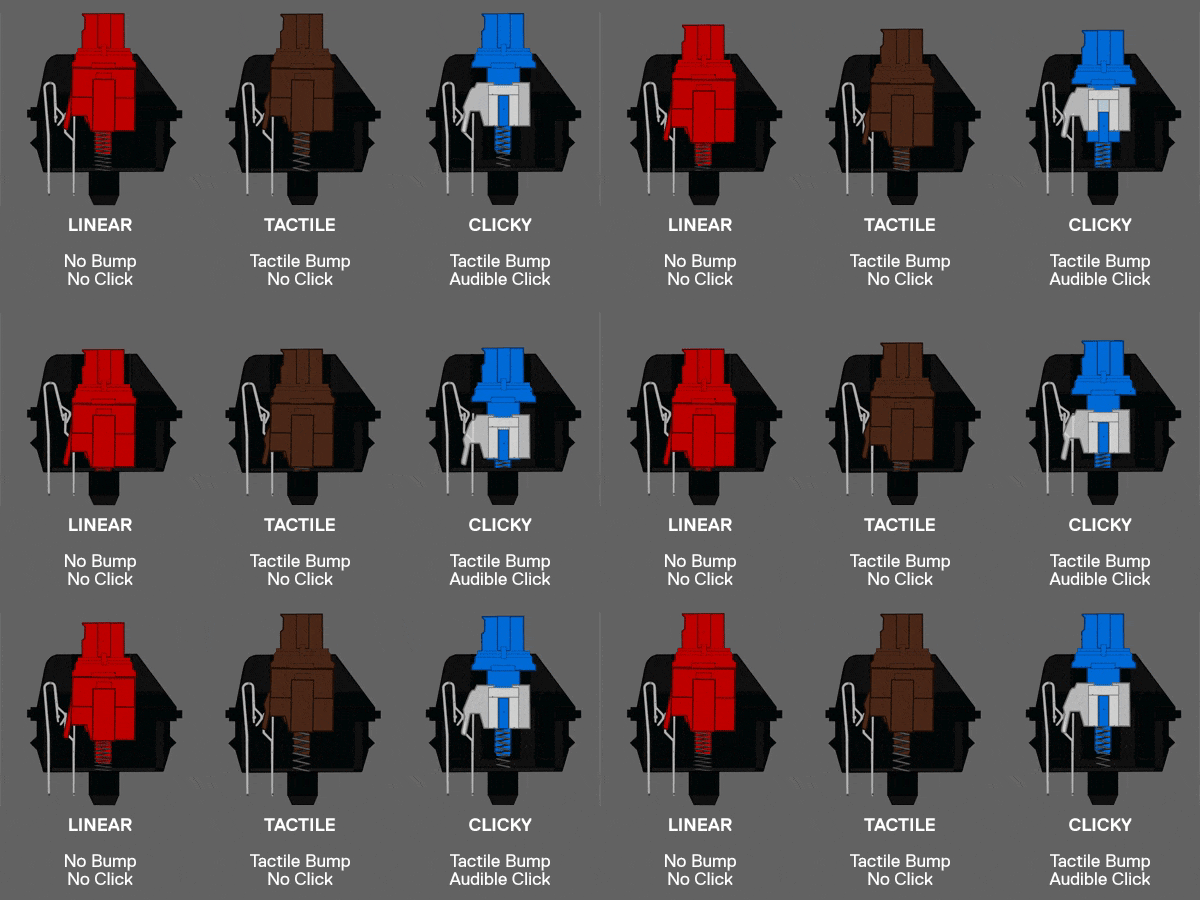
Before buying boxes of switches from Shopee, you need to understand the spec sheets.
| Term | Definition |
|---|---|
| Actuation Force | How hard you need to press to register a key (measured in grams/gf). 45g is light; 67g is heavy. |
| Bottom-out | The force required to press the key all the way down until it hits the housing. |
| Travel Distance | Total distance the stem moves. Standard is 4.0mm. "Speed" switches are shorter (3.4mm). |
| 3-Pin vs 5-Pin | 5-pin (PCB mount) has extra plastic legs for stability. 3-pin (Plate mount) fits any hot-swap socket. |
Smooth consistent keystroke with no bump. The stem goes straight down.
A noticeable "bump" in the middle of the keypress to let you know it registered.
Tactile bump accompanied by a sharp audible "click" mechanism.
Based on availability on Lazada, Shopee MY, and local vendors like Mecha Store.
Most "Pro" switches in 2025 come pre-lubed from the factory, which is usually good enough for beginners. However, hand-lubing with Krytox 205g0 (for linears) or Tribosys 3203 (for tactiles) is the single best upgrade you can make to improve sound and feel.